
Welcome to Onpech game page! On this page you will see some Onpech games mostly developed in the mid 1990s. Download these games, unzip them, and run them on your computer - no installation required. Did I mention they are free?
Here are some of the games that we have 'cleaned up' and passed the QA. Visit here frequently as we will add more games in the future.
Jones 2
Maths
Maths 2
Jones 2
Genre: Platform jumping (Similar to Super Mario)
Platform: Windows 9x
Requirement: DirectX 2.0, Pentium
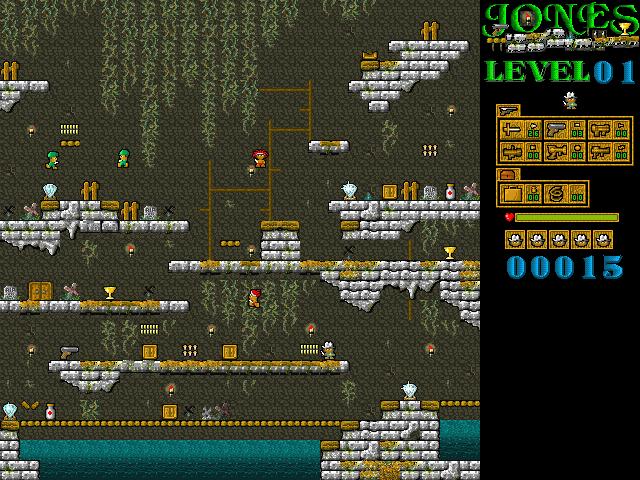
Screen shot of Jones 2, Level 1.
Instructions and Hints
The goal of this game is to kill all the enemies and collect as many treasures as possible. Your character can walk left and right and jump. Although it is impossible in the real world, your character can change direction while airborne. You kill enemies by firing your weapons. Usually the enemies do not die with one hit. You have to keep firing at them until their hit points reduce to zero. The same rule applies to your character. Upon disposing all enemies, a door will open and you can enter it to advance to the higher level. Remember to collect all treasures before entering the door.
There are two special items in the game: the doctor bag and the spring. The doctor bag can heal your character when his hit point is too low; the spring allows your character to jump higher.
You start with some basic weapons, and will be able to pick up better weapons as you advancing levels. There are 6 different weapons in the game, ranging from the throwing dagger to Laser gun. Be aware that the weapon will only fire when your character is facing left or right. Also make sure you have enough ammo to fire your weapons.
This game supports up to two players. The first player uses the keyboard, and the second player uses either the keyboard or a Joystick. The rules for the two-player mode are identical to the single player. However the two players can kill each other.
Player 1
Left: Keypad Left
Right: Keypad Right
Jump: Keypad Up
Fire: Enter
Switch weapons: Keypad Insert
Player 2
Left: a
Right: d
Jump: w
Fire: Shift
Switch weapons: Tab
Enjoy!
Maths
Genre: Puzzle Solving
Platform: DOS, you can run it in the DOS mode under Windows 9x
Requirement: 386
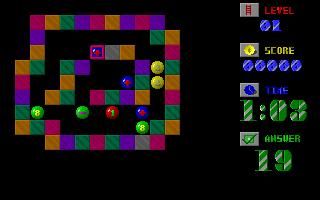
Screen shot for Maths, level 1.
Instructions and Hints
This game requires the player to have some basic mathematical skills (arithmetic to be precise). On each level, you will see some balls with numerical numbers (0-9) and the symbols of summation (+), subtraction (-), multiplication (*), and division (/) inside a maze. You will also see the 'answer' on the lower right coner of the screen. Your mission is to arrange these balls so the arithmetic result matches the answer. For example, if you are given an answer of '6', and there are a '3' ball, a '7' ball', a '4' ball, a (+) ball, and a (-) ball in the maze, you can arrange the balls so they will form an equation of:
3 + 7 - 4
or
3 - 4 + 7
or so on. You are not required to use all the balls in the maze. Remember there is a countdown timer. You will lose the game if you cannot solve the puzzle by the given time.
To move the balls around, first you need to select the balls. Moves the cursor on the targeted ball using the direction keys in the keypad, and press Enter to select the ball. You can then move the selected ball up, down, left, or right by pressing the direction keys. The ball will move to the direction you specified until it is blocked by the maze wall or other balls. Press enter again to release the ball, and move on to other ball.
Note: Execute Maths.bat to run the game. There is also file called Gameset.exe, where you can set the level yourselves. We also include the QuickBasic source code of this program, in case you want to do something with it.
Maths 2
Genre: Puzzle Solving
Platform: DOS, you can run it in the DOS mode under Windows 9x
Requirement: 386
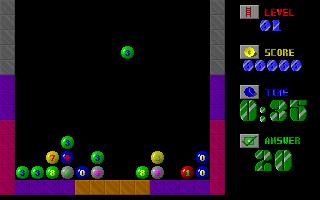
Screen shot for Maths 2, level 1.
Instructions and Hints
Like Math, this game also requires the player to have some basic mathematical skills. This game is similar to the Tetris, however in this game you will see balls with numerical numbers (0-9) and the symbols of summation (+), subtraction (-), multiplication (*), and division (/) droping down. You will also see the 'answer' on the lower right coner of the screen. Your mission is to arrange these balls so the arithmetic result matches the answer. You will lose the game if the balls stack up to the top of the screen. You are allowed to adjust the position of the balls using the direction keys.
Note: Execute Maths2.bat to run the game. We also include the QuickBasic source code of this program.
Copyright © onpech.net
Last update Tuesday, April 30, 2002